
This is part 2 of “Anatomy of a Story Game”.
This week, we’ll complete the basic story design and discuss some implementation issues in various media.
A story state-diagram
A state diagram is something used in software engineering to design a state machine. We’re going to use one to design an interactive story. That’s a lot of 25-cent verbiage, but the concept is simple. We’re simply going to draw out the possible plots of our story.
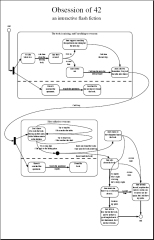
Story state-diagram (PDF file)
In part 1, I wrote out a flash-fiction story. As a very short story, it has only a few opportunities for interactivity, but it does have a few. I started by writing the story in sections, similarly to the way you might write summaries of the sections of a novel on index cards so that you can arrange them visually and see the story flow, so that you can plan your novel.
In this case, we’re doing something similar, based on the same idea, but with a slightly different use of the idea. I’ve written out each of the player-events in the story (or summaries of them) and arranged them into a state diagram.
This state diagram represents an abstract view of the story. It does not necessarily correspond one-to-one with entities in the virtual world or narrative. Events, for example, include only things that the player does that actually move the story forward. Other things the player may do in a game, such as traveling back and forth through the game’s virtual world, do not necessarily generate story events and may not appear on this diagram. This state diagram is only an organizational tool to help us visualize the story.
States
In the diagram, each rounded rectangle is a state. A state is as if you were watching the story on a video tape and you hit the pause button. That frozen point in the plot is the state described inside each rounded rectangle. This is the point at which the player must decide what to do next, in order to progress the plot.
In our story, since it’s being written as a hypertext “choose your own adventure” type of story, the states themselves have no physical form. They simply represent the point to which you’ve read, where you’ve put the bookmark before deciding what to do next.
In interactive fiction and graphical adventure games, the player navigates through a virtual world, interacting with that world, manipulating objects in that world. In this kind of game, a story state may represent the state of various objects or characters in the world. For example, in a Myst-style puzzle-solving game, you might have a locked door. Before you discover the lock combination, the door is closed. That’s one state: “closed door.” After you unlock the door and open it, you’ve moved the story to a new state: “open door.”
Events
Each arrow in the diagram is a player event, something the player can do to push the plot along. Using the video-tape metaphor, this is the time during which we’re actually playing the tape, inbetween pauses, inbetween states. Events move the story from one state to the next.
In a hypertext interactive story, events correspond to passages that the user can read. These are the sections of narrative that I previously wrote. And you can see that the arrows are labelled with the headings of the narrative passages from part 1.
In interactive fiction and graphical adventure games, events usually correspond to cut-scenes. In the locked-door example above, when we unlock the door, we might watch a cut-scene showing the door open, after which time whenever we visit the room with the door, it will remain open.
Choices
During the plot, our character Martin (and thus the player) may face choices. Depending on which path he chooses, the plot will take a different path.
For example, after he asks Jane about the missing book, and Jane feels as though he’s accusing her, he can choose to state his accusation straight-out, or he can choose to backpedal. This story is so simple, each choice represents only a small diversion. But you could make the difference much more involved.
Concurrent states
Immediately after the introduction, denoted by the arrow coming from the “start” of the diagram, the story splits into two story threads. In one thread, Martin questions the guests from his dinner party in order to clue in on who might have misplaced or stolen his book. In the other thread, he searches his apartment, in case someone just misplaced the book, maybe put it on the wrong shelf or something.
These two threads happen independently, as shown in the diagram. At any time, both plot threads will be in force, and one state from each will be active. These are called concurrent states.
Again, this is a very simply story, with only two major sections, each of which has only two concurrent states. Typically, an adventure game will have at least three sections, each with at least three concurrent states, plus a “boss” sequence at the end (which this story also has).
Choices based on state
In the second part of the story, after Martin tries to trap Jane, the story goes one of two ways, depending on whether Martin had previously found the book. Whether Martin had found the book is part of the other story thread. So one concurrent state can effect choices made from other states.
This happens more than is actually shown on the diagram. I’ve simplified the diagram to make it more manageable. For example, in the first part of the story, when Martin talks to Jane, Pat, and Dory, he might have slightly different conversations depending on whether he had searched his apartment first and failed to find the book. This will affect the narrative, but not where the arrows point. If we were to draw this on the state diagram, it would be represented by a pair of arrows, each going between the same two states, but each with a different condition on it.
If you write such a story as a book or a simple web page, the number of pages you need to write quickly balloons, because each page could have multiple versions, depending on how many concurrent states you need to take into account. (The number of possible variations is 2n-t, where n is the number of rounded rectangles in the other story threads and t is the number of other story threads. So if you had three threads total, each with three states, each thread has 2 “other threads,” which each have 3 states, and the number of variations is 26-2=16 possible variations.)
Fortunately, if you can write any software at all, you can get the computer to handle the variations by generating them on-the-fly. This is what I will do with this story. I’m still finishing up the implementation, but I’ll post it later this week.
Leave a Reply